






 Hotel operations
User guide · Housekeeping Staff
Report a room issue
Provide enough information for the responsible person to identify the room and urgency.
- Have the room number, description, priority and relevant photos ready.
- Sign in with the correct role and check the account name in the menu.
Housekeeping StaffStep-by-step instructions
Check the room being serviced
Housekeeping Staff
1Step 1 of 2
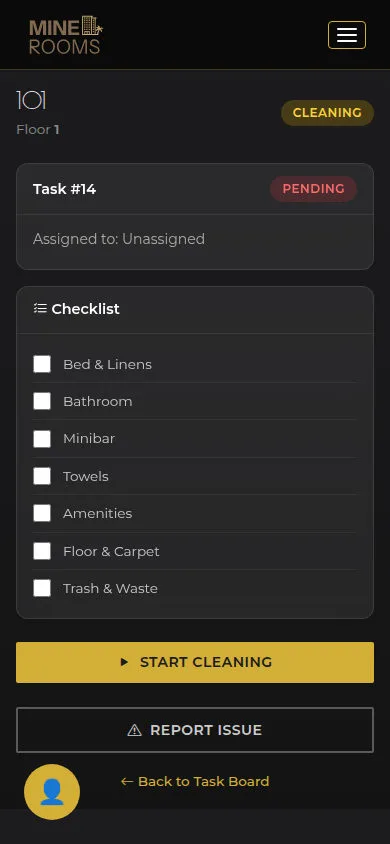
Check the information on this screen before continuing.
- Open the task on your phone; check room number and task before reporting an issue.
Open on site ↗sign-inFull-page screenshot ↗
What you should see
The report will refer to the room being handled.
Complete Report Issue
Housekeeping Staff
2Step 2 of 2
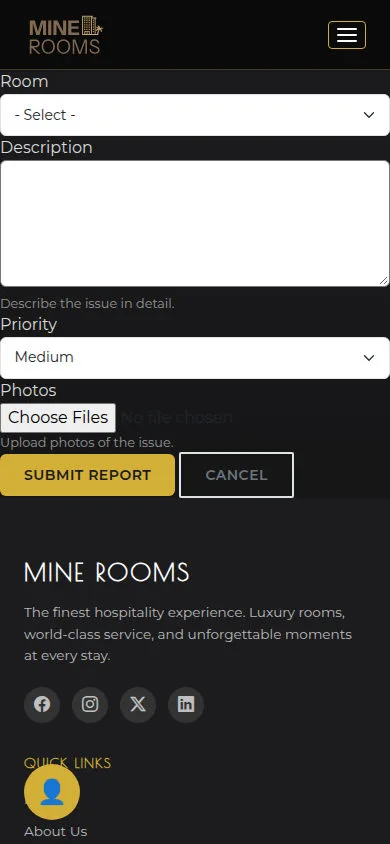
Check the information on this screen before continuing.
- Choose Room and enter Description, Priority and any Photos; check the details before Submit Report.
Open on site ↗sign-inFull-page screenshot ↗
What you should see
After submission, read the response; if it fails, retain the details and inform the responsible person.
1 / 3