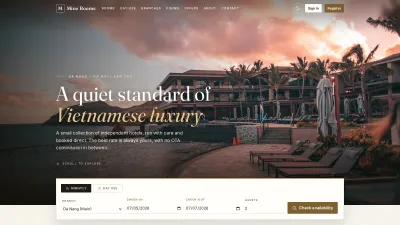




Homepage & Navigation
About this screen: Public home page with booking, featured rooms, and key services.
Navigation: Open the homepage
- Click BOOK NOW to start a reservation.
- Check Featured Rooms for room types and pricing.
- Use the Footer links for Rooms, About, Branches, Contact, and FAQ.
Our Branches
About this screen: A list of Mine Rooms branches with location details and map access.
Navigation: Top menu → BRANCHES
- Each branch card shows the branch name, address, and contact info.
- Click a branch card to open the full branch detail and available rooms.
- Use the interactive map to find the nearest branch.
Branch Detail
About this screen: Full details for a selected branch, including address, contact details, operating hours, and available room types.
Navigation: BRANCHES → Select a branch
- View the branch's full address and phone number.
- Check which room types are available at this location.
- Click Book Now on the branch page to pre-select this location.
Rooms Listing
About this screen: All available room types with pricing and key features.
Navigation: Top menu → ROOMS
- Room cards show the name, price, capacity, and key amenities.
- Click VIEW DETAILS on any room card to open the full description and photos.
- The guide covers Deluxe Room, Family Room, Standard Room, and Executive Suite.
Room Detail
About this screen: Room details, gallery, amenities, and booking widget.
Navigation: ROOMS → VIEW DETAILS on any room
- Browse the photo gallery.
- Read the description and amenities.
- Use Book Now to select dates.
- Check capacity and bed type before booking.
Reserve Your Room
Search availability, enter your details, then confirm your booking.
Step 1: Search
Pick dates & location
Step 2: Info & Pay
Select room & guest details
Step 3: Confirm
Review & submit booking
Step 1: Search Availability
About this screen: Search rooms by date, guest count, and branch.
Navigation: Click BOOK NOW (header) or HOME → Search widget
- Select Check-in and Check-out dates.
- Enter the guest count and choose a branch if needed.
- Click Search to see available rooms for your dates.
Step 2: Select Room & Enter Info
About this screen: Choose a room, enter guest details, and select payment.
Navigation: After Step 1 → Step 2 shown automatically
- Click a room to highlight it.
- Fill in Full Name, Email, and Phone.
- Enter a Coupon Code if needed, then click APPLY.
- Choose Cash, Card, or MoMo, then click CONTINUE →.
Step 3: Confirm Booking
About this screen: Review your booking summary before submitting.
Navigation: After Step 2 → Step 3 automatically displayed
- Review the Room type, Dates, Guest name, and Total price.
- Verify the payment method from Step 2.
- Click ← BACK to edit or CONFIRM BOOKING to finish.
Booking Confirmation
About this screen: Your confirmation page and booking reference.
Navigation: After Step 3 Confirm → Confirmation page shown automatically
- Save the Booking Reference Number for check-in.
- A confirmation email is sent to you.
- Status starts as Pending until confirmed.
- Click VIEW MY BOOKINGS to track it later.
Restaurants & Hotel Dining
Discover the on-site restaurants and review their menus before your stay.
Browse
Find hotel restaurants
View Menu
Browse food & drink items
Order In-Room
Order via your guest account
Restaurants
About this screen: A listing of all restaurants operated by Mine Rooms hotels.
Navigation: Top menu → RESTAURANTS
- Each restaurant card shows: name, cuisine type, branch location, and a thumbnail
- Click a restaurant card to view its full menu
- Restaurants are tied to specific branches, so check the branch tag on each card
View Restaurant Menu
About this screen: The full food and drink menu for a specific restaurant.
Navigation: RESTAURANTS → Click a restaurant → VIEW MENU
- Menu items are grouped by category (appetizers, mains, desserts, drinks)
- Each item shows: name, description, and price
- Logged-in guests can click Add to Cart to place in-room orders
About, FAQ & Contact
Learn more about Mine Rooms, find answers to common questions, or get in touch with our team.
About Us
Our story & values
FAQ
Common guest questions
Contact
Reach our support team
About Us
About this screen: Mine Rooms' brand story, mission, and hotel philosophy.
Navigation: Top menu → ABOUT
- Read about the hotel's founding story and hospitality vision
- Learn about the team and service standards
- Discover the locations and expansion plans
FAQ
About this screen: Frequently asked questions covering bookings, check-in/out, payments, and hotel policies.
Navigation: Footer → FAQ
- Questions are organized by topic (Booking, Check-in, Payments, Amenities)
- Click a question to expand and read the full answer
- If your question isn't listed, use the Contact page to reach support
Contact Us
About this screen: A contact form and hotel contact information for reaching the Mine Rooms support team.
Navigation: Top menu → CONTACT
- Fill in: Your Name, Email, Message then click Send
- Find the hotel's phone number, email address, and physical address
- View the embedded map for directions
Terms & Conditions
About this screen: The hotel's full terms of service, including booking policies, cancellation rules, and guest responsibilities.
Navigation: Footer → Terms & Conditions
- Read the Cancellation Policy to understand refund eligibility timelines
- Review Check-in / Check-out times and late checkout conditions
- Understand guest liability and property damage policies
Login & Password Recovery
Sign in to your Mine Rooms account to manage bookings, order in-room dining, and track loyalty rewards.
Login
Access your account
Reset Password
Recover account access
Login
About this screen: Log in to your existing Mine Rooms customer account.
Navigation: Top menu → LOGIN
- Enter your Username and Password, then click Log In
- Use Forgot Password? to recover your credentials
- New visitors: click Create Account to register
Reset Password
About this screen: Recover access to your account by resetting your password via email.
Navigation: Login page → Forgot Password?
- Enter your registered email address
- Click Submit: reset link sent to your inbox
- Check email and click link to set new password
- Return to Login page and sign in with new password
Running MineRooms in your own organisation
Names, prices and plans on these screens are set up differently for each deployment. We deploy MineRooms on your domain and adapt it to how you work, and you receive the running system and its source code.