

Internal knowledge tends to live in many places at once: policies on a shared drive, forms attached to old emails, reports on project sites that closed with the project, and a separate address for every internal tool. We build the place it ends up in: a staff intranet, a portal for members or partners, or a document library and resource hub, on Drupal. Most of the work is structure: what each document is, how people will look for it, who may read it and who may publish it.
Who this is for
- Staff spread across offices. Policies, forms, manuals and internal tools that people need every day, in one place behind a staff login.
- An organisation with members or partners. A portal where registered members reach what the public cannot, and add material of their own.
- A publisher of reports and research. A catalogue for publications, reports and media, searchable along the lines your organisation works in: programme, country, project.
- A programme or network that shares practice. A resource hub that gathers guidelines, case studies and toolkits from many sources and lets readers narrow them by place and type.
- A coalition with working groups. A public page for each group, with the group's own files open to its members after sign-in.
The sector these organisations work in is covered on the nonprofit and intergovernmental page. This page is about the system itself.
What you get
- A content model for your documents: their types, catalogue fields and the vocabularies people search by
- A role and permission matrix, agreed before the build and tested by signing in as each role
- Search with filters that match how people look: by topic, department, country, programme or type
- Submission and review workflows for contributors, with nothing published until it is approved
- Existing documents moved in with their metadata, and a list of what could not be mapped
- Training for the editors and for the people who approve what they submit
Sample Content model Staff intranet on Drupal 11
Policy Content type
titleTextfield_policy_fileMedia: documentfield_effectiveDatefield_next_reviewDatefield_departmentDepartmentfield_audienceAudience
Internal tool Content type
titleTextfield_tool_linkLink to the systemfield_how_toMedia: system manualfield_departmentDepartment
Department Taxonomy
nameTextparentDivisionfield_contactEmail
Editorial roles
- Staff Reads everything behind the login and marks favourites
- Department editor Drafts and updates the pages of one department
- Approver Publishes a policy, or returns it with notes
How the work runs
The order is the same as for any build we run, with one difference at the start: the people responsible for your IT and information security are in the room from the first session, because permission decides what exists for each person. The process is written up in full in how a project with us runs.
How an intranet or portal build runs
- Discovery Audiences, roles and what each may see, with your IT in the room. Output: the role matrix
- Prototype The signed-in experience of the main roles, on real code, at no charge. Output: the prototype
- Fixed price Priced once the content model and the permission matrix are agreed. You keep the architecture document
- Build Working demos on a staging site, with documents moved in as the work lands. You keep the repository
- Acceptance Every role signed in and tested against the matrix before launch. You keep the test record
- Warranty Defects in what we built are ours to fix, one year by default and up to three. You keep the handover pack
What a staff intranet holds
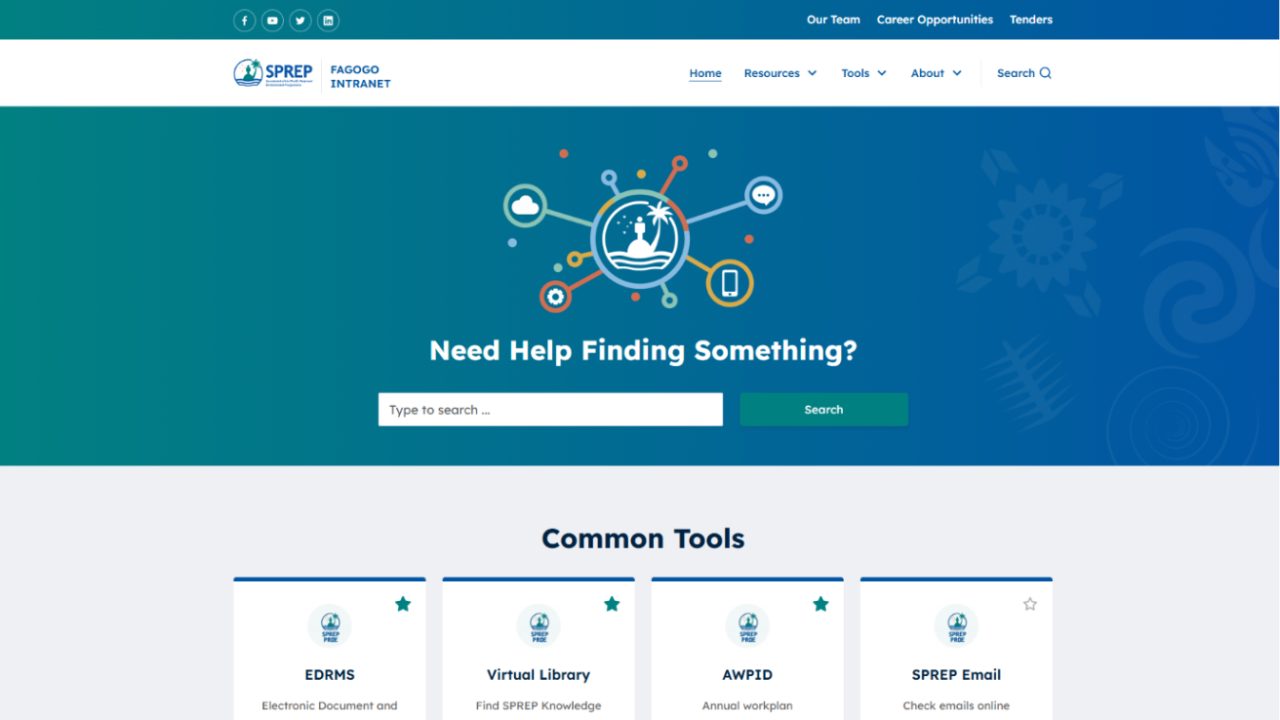
Fagogo, the intranet we designed and built for SPREP, shows what staff actually come for. Every page sits behind a staff login. The homepage opens with a search box, then cards for the internal systems staff use day to day, from the records system and the Virtual Library to project information and performance planning, each with an address of its own that the intranet gathers in one place.
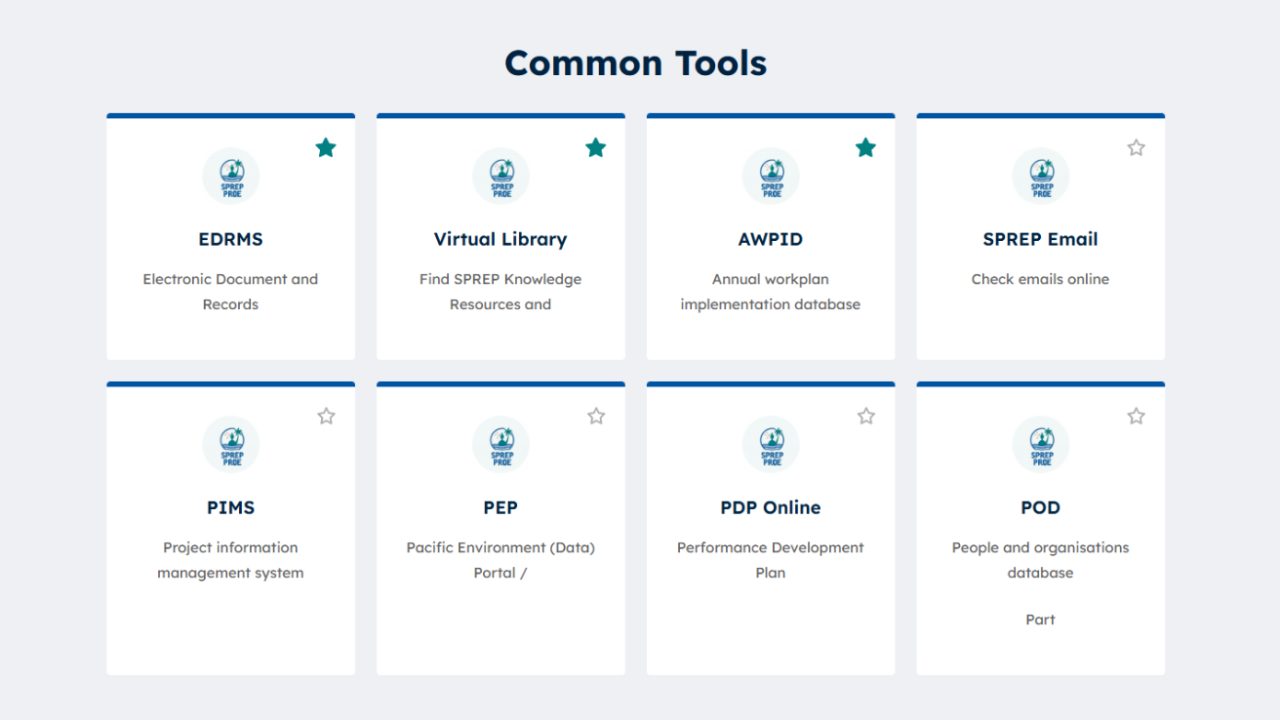
Behind the homepage, policies are grouped under the part of the organisation they come from, such as human resources, finance, internal audit and information technology, and each policy opens on a page of its own. Staff mark tools and resources as favourites, and new staff find induction videos to watch before their induction starts. None of this is unusual. What makes it work is structure: a policy is a piece of content with a department and a page of its own, not a file dropped into a folder.
Digital libraries, knowledge hubs and search
A digital library is a catalogue before it is a website. The SPREP Virtual Library, which we designed and built as SPREP's digital repository, keeps full catalogue records: publisher, year and place, call number, the countries a publication concerns, subject headings, language and linked projects, with the digital copy to download. Readers search it in general or in detail, and narrow the results by collection, material type and tag.
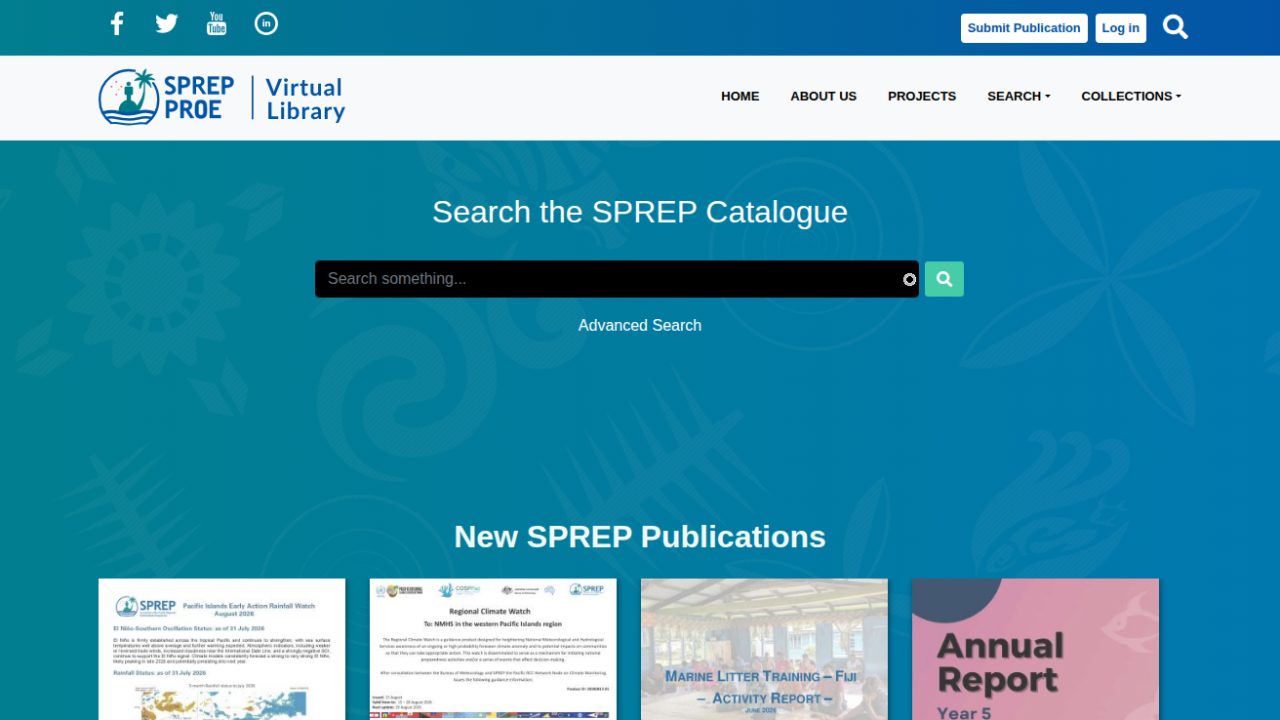
The library is organised along the lines SPREP works in: by programme, by member country through a clickable map, by project, and through curated collections. Physical media such as audio cassettes, videos and slides are catalogued beside new PDFs, so older material turns up in the same search.
A knowledge hub is the lighter form of the same idea. The Pacific NbS Resource Hub is SPREP's knowledge product for nature-based solutions: tools and guidelines, case studies and lessons learned, financing and opportunities, community guides, training material and research, gathered in one searchable place rather than scattered across agencies.
Members, contributors and approval
A portal stays current when the people it serves can add to it. On the Virtual Library, registered contributors submit publications through a Submit Publication entry point behind a log-in. On the Pacific NbS Resource Hub, which we built for SPREP from the sprep.org base, members log in, and the case studies, tools and news that contributors submit are reviewed by the hub's administrators before they are published. The Pacific Islands Roundtable site keeps its public document library open to everyone and makes working-group files available to members after sign-in.
The Weebpal team are awesome and easy to work with. They have made the design and development of the "Pacific NbS Resource Hub" a breeze and they are quick, efficient and I am really happy with the quality of their work and I highly recommend them.
Who sees what
Permissions are designed as a matrix before anything is built, then tested by signing in as each role. The example below is a portal with a public side; your own matrix is drawn from your roles.
| What | Visitor | Member | Staff |
|---|---|---|---|
| Public pages and the catalogue | Reads | Reads | Reads and edits |
| Members' files and working-group pages | Hidden, also in search | Reads | Reads and manages |
| Submitting material | No | Submits for review | Submits and reviews |
| Publishing | No | No | Publishes after review |
| The staff intranet | Hidden | Hidden | Signs in |
What it costs
A secure portal or intranet sits in the Large band on the pricing page. Public libraries and resource hubs with faceted search, staged approval and a members' area also sit in this band. The price is fixed against the permission matrix and the content model, because those decide the work, not the number of pages.
Moving existing documents in is scoped from a sample of them, since their metadata varies more than anything else in the project. Maintenance after launch is priced separately under maintenance and support.
Work we have delivered
The full case studies behind the screenshots on this page.
-
SPREP Virtual Library
The SPREP Virtual Library: a Drupal digital repository we designed and built for SPREP's publications, reports and media, and still maintain.
Read the case study -
Pacific NbS Resource Hub
The Pacific NbS Resource Hub: a Drupal knowledge product we designed and built for SPREP from the sprep.org base, and maintain.
Read the case study -
Fagogo
Fagogo, SPREP's staff intranet: designed and built by WeebPal in Drupal from the sprep.org base, and maintained since launch.
Read the case study
Terms that hold
These terms hold across our services; where a service starts differently, its page says how. The full wording is on the warranty page and in why you own the source code.
- A prototype before you sign a build Before a build project is signed, we build a prototype at no charge: a design, a clickable prototype or a working demo on real code, so you decide against something real.
- You receive the system and its source code Custom work is yours from the first commit: the repository, custom modules, theme and deployment configuration. When we build your system on one of our products, you receive the whole system and its source code as well.
- A warranty on development work Development projects carry a 1-year warranty by default, up to 3 years. It covers defects in what we built, and applying the security releases of Drupal core and contributed modules while the warranty runs. Maintenance picks up where the warranty leaves off.
- Response targets we publish Critical issues are answered first, high priority within 1 business day and normal within 3 business days. Support runs in business hours; cover outside them is an option, priced separately.
Questions we get asked
Can staff sign in with the accounts they already use?
That is usually the aim, and it is settled early. Where your organisation already has a directory, the prototype proves sign-in against a test copy of it before the price is fixed, because it is the part most likely to hold surprises. Where there is no directory, accounts are managed in the portal itself, with roles assigned by the people you name.
How do you keep confidential documents out of search results?
The search index follows the same permissions as the pages: a document a person may not open does not appear in their results, and its file is served through Drupal's access checks rather than from a public folder. We test it by searching as each role before launch.
Can people outside the organisation submit material without seeing internal content?
Yes. A contributor role submits into a review queue and sees its own submissions, and nothing else behind the login. An editor approves each item or returns it with notes before anything is published.
We have thousands of documents on a shared drive. Can they be moved in?
Yes, with their metadata where it exists: title, date, author, and whatever the folder structure says about topic or department. We map a sample first, show you the result in the prototype, and list what cannot be mapped so it becomes a decision rather than a surprise. Files nobody can describe are better left out than catalogued badly.
Why build an intranet on Drupal rather than buy one?
When the intranet has to share a base with your public site, hold a real catalogue, or give members and staff different views of the same content, a Drupal build does that without a fee per seat. If an off-the-shelf intranet already fits how your staff work, it will cost less, and we will say so. More on when Drupal is the right choice.
Can each department look after its own pages?
Yes. Content carries the department it belongs to, and an editor can be limited to one department's pages, documents and policies, while a central team approves what is published. On Fagogo, policies are grouped under the part of the organisation they come from.
Can the intranet share its design with our public website?
It can, and the organisation then looks the same on both sides. Fagogo was built from the base of sprep.org, the public site we redesigned for SPREP, and carries the same identity on the staff side. How far that sharing can go is covered on Drupal multisite and site families.
Not covered here? Ask us directly.
Describe your intranetDrupal Development
Related services
- Drupal Development Services
- Headless and Decoupled Drupal
- Drupal Website Redesign and Theme Rebuild
- Drupal Multisite and Site Families
- Drupal Commerce Development
- Drupal Module Development and Porting
- Outsource Drupal Development
- Drupal 7 and Legacy CMS Migration
- Drupal Upgrade to Drupal 11 and 12
- Drupal Site Audit
- Drupal SEO Services: Full SEO and Performance Audit
- Drupal Security Audit
- Drupal Accessibility Audit
- Drupal Support and Maintenance
- Managed Drupal Hosting
- Drupal DevOps and CI/CD
- QA and Software Testing for Drupal
- Drupal Performance Optimization and Core Web Vitals
Tell us who needs to see what
Describe the people who will sign in, the documents they need and the systems they already use. We will come back with the questions that decide the price.