

Drupal Commerce is the e-commerce framework for Drupal: products and their variations, carts, checkout, payments and orders live in the same system as your content, your users and your permissions. We build stores on it, write the payment gateway when your provider has no maintained module, and move stores off Drupal 7 with their products, customers and orders.

Who this is for
- Your store runs on Drupal 7. Commerce 1.x or Ubercart, on a version that lost community support on 5 January 2025, and the store has to move without losing its catalogue or its order history.
- You sell digital products. Files, fonts, templates or documents that are released on payment and must stay tied to the customer who bought them.
- Your content and your shop should be one site. Articles, guides and products that link to each other, edited by the same team under one login.
- Your payment provider has no maintained Drupal module. A regional bank gateway or a local wallet, and the store cannot open without it.
- An agency with a Drupal Commerce client. A store to build or move under your name, through white-label development.
How commerce work varies by sector, from B2B price lists to marketplaces and stock held in an ERP, is covered on e-commerce and retail. This page is about building on Drupal Commerce itself.
What you get
- A store model agreed before the build: product types, variations and attributes, and how they appear in the catalogue
- Checkout and order workflow set to how you fulfil: shipped goods, downloads, or orders a person reviews
- Payment gateways integrated and tested end to end in the provider's sandbox before live keys are used
- For digital products, files released on payment and kept in the customer's account
- For a store moving off Drupal 7, products, customers and orders migrated, with a redirect for every changed URL
- The store and its source code, handed over with documentation for whoever runs it
Sample Store model on Drupal Commerce A shop selling e-books as downloads
E-book Product type
titleTextbodyFormatted textfield_subjectSubjectvariationsE-book edition
E-book edition Product variation type
skuText, uniquepricePriceattribute_formatFile formatfield_downloadPrivate file
Order Order type, default workflow
order_itemsE-book editionuidCustomerstateDraft, completed or canceledpayment_gatewayGateway
Store roles
- Customer Buys, pays and downloads from their account
- Store manager Edits products, prices and promotions
- Fulfilment Reviews orders that need a person, and issues refunds
How a store build runs
How a Drupal Commerce build runs
- Discovery Catalogue, payment providers, fulfilment and the systems the store must talk to. Output: the discovery notes
- Prototype A slice of your real catalogue on Drupal Commerce, with checkout on the sandbox gateway, at no charge. Output: the prototype
- Fixed price Priced once the store model and the integrations are agreed. You keep the architecture document
- Build Catalogue, checkout, gateways and migration, shown on staging as each part lands. You keep the repository
- Acceptance Test orders through every payment method, refund and download path before launch. You keep the test record
- Warranty Defects in what we built are ours to fix, one year by default and up to three. You keep the handover pack
Catalogue and digital products
Drupal Commerce separates the product, which carries the description, images and category, from its variations, which carry the SKU, the price and the attributes a customer chooses, such as a size or a colour. Get that split right and the catalogue can be filtered, searched and repriced without duplicating content. Get it wrong and every price change means editing hundreds of pages by hand.
Digital products add their own rules. The file stays private until the order is paid, the download belongs to the customer's account, and a licence may limit how long it can be fetched. On a large catalogue, browsing matters as much as search: customers look by category, subject or style as often as they type a name.
Payment gateways
A Drupal Commerce payment gateway is a plugin that works either on-site or off-site. An on-site gateway keeps the customer on your checkout and sends card details from the browser straight to the provider as a token, so card numbers never touch your server. An off-site gateway sends the customer to the provider's own page and back. Either way the order is marked paid only when the provider confirms it, usually through a signed notification to the store.
An off-site payment on Drupal Commerce The order is paid when the provider says so, not when the customer returns
Checkout Drupal Commerce creates the order and the payment
Redirect and return
Payment provider Card, bank transfer or e-wallet, on the provider's own page
Signed notification
Order completed Payment recorded, files released, receipt sent
Accounting Payments exported for reconciliation
When your provider has no maintained Drupal Commerce module, we write the gateway as a module in your repository, against the current Commerce API, and test it in the provider's sandbox before live keys are used. The tests cover the awkward cases as well as the normal one: a payment that succeeds at the provider but whose notification never reaches the store, a customer who closes the tab before returning, a partial refund.
Moving a store off Drupal 7
A Drupal 7 store usually runs Commerce 1.x or Ubercart, and neither upgrades in place. The store is rebuilt on current Drupal Commerce and its data is migrated into it through the Migrate API, with the Commerce Migrate module supplying mappings for both. Products, variations, customers, addresses and orders move across, so customers still see their order history, and passwords carry over, so they sign in as before.
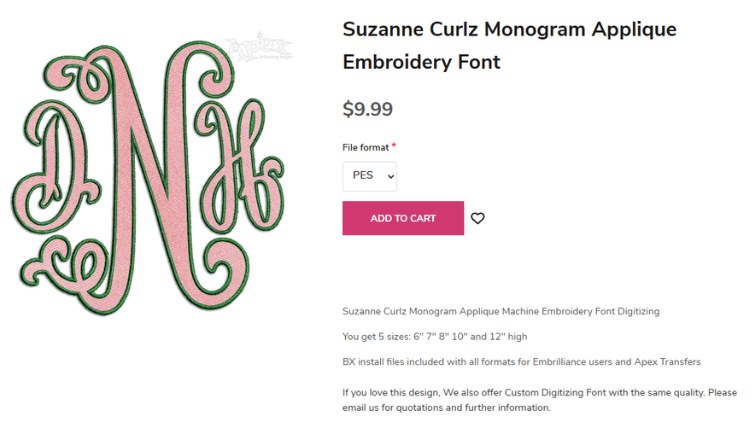
The trial migration runs on a copy until the numbers match: product counts, order totals and a sample of customer accounts checked against the old store. Volume is planned for from the start: for Apex Embroidery Designs, an online shop for digital embroidery designs, 20 million data items moved from Drupal 7 into the rebuilt Drupal site.
How a migration runs in general, with the redirect map and the rehearsed cutover, is on Drupal 7 and legacy CMS migration.
What a Drupal Commerce store costs
A store is priced from its catalogue model, its payment methods, the systems it must reconcile with and, for a move, the volume and condition of the data. A store with a standard catalogue and a common payment provider usually sits in the Small or Medium tier on the pricing page. Account pricing, approval steps or a link to an ERP move it to Large, the Complex Content / Transaction Product tier.
The price is fixed once the prototype has shown the store model working on your own products. Running the store afterwards, with security releases for Drupal Commerce and its gateways, is maintenance and support.
Work we have delivered
The full case studies behind the screenshots on this page.
Terms that hold
These terms hold across our services; where a service starts differently, its page says how. The full wording is on the warranty page and in why you own the source code.
- A prototype before you sign a build Before a build project is signed, we build a prototype at no charge: a design, a clickable prototype or a working demo on real code, so you decide against something real.
- You receive the system and its source code Custom work is yours from the first commit: the repository, custom modules, theme and deployment configuration. When we build your system on one of our products, you receive the whole system and its source code as well.
- A warranty on development work Development projects carry a 1-year warranty by default, up to 3 years. It covers defects in what we built, and applying the security releases of Drupal core and contributed modules while the warranty runs. Maintenance picks up where the warranty leaves off.
- Response targets we publish Critical issues are answered first, high priority within 1 business day and normal within 3 business days. Support runs in business hours; cover outside them is an option, priced separately.
Questions we get asked
Should we use Drupal Commerce or a hosted product such as Shopify?
If the store is the whole business and the catalogue is standard, a hosted product is often the cheaper choice, and we will say so. Drupal Commerce earns its place when the store sits inside a content-heavy site, when products need a model a hosted product cannot express, or when you need to own the code and the data outright.
Can you move an Ubercart store as well as Commerce 1.x?
Yes. Ubercart on Drupal 7 moves to Drupal Commerce by the same route: a rebuilt store on current Drupal and a migration of products, customers and orders into it. The mapping differs, because Ubercart stores products and orders differently, and the audit shows what needs a decision before the trial run.
Do customers have to re-enter their details after a migration?
No. Accounts, addresses and passwords migrate, so customers sign in as before. Saved cards are different: they are held by the payment provider, not by Drupal, and whether they carry over depends on the provider's tokens, which we check with the provider before the move.
Which payment providers can you integrate?
Any provider with a documented API. Many already have a Drupal Commerce module, and we use it when it is maintained and has a release for your Drupal version. Where none exists, or the one that exists has been abandoned, we write the gateway as a module in your repository.
Who is responsible for PCI compliance?
You are, as the merchant, but the choice of gateway decides how much of it falls on your site. With an off-site gateway or card fields supplied by the provider, card numbers never reach the Drupal server, which keeps most of the requirements with the provider. We build that way unless there is a reason not to.
Can one installation run several stores or currencies?
Yes. Drupal Commerce supports more than one store in a single site, each with its own currency, tax settings and products, so a brand selling in separate markets does not need separate sites to do it.
Can we sell subscriptions or licences?
Yes, through contributed modules for recurring billing and licences that work with Drupal Commerce. We check that each has a release for your Drupal version and an active maintainer before the store depends on it, and say so in the discovery notes when one does not.
Not covered here? Ask us directly.
Describe your storeDrupal Development
Related services
- Drupal Development Services
- Headless and Decoupled Drupal
- Drupal Intranet and Portal Development
- Drupal Website Redesign and Theme Rebuild
- Drupal Multisite and Site Families
- Drupal Module Development and Porting
- Outsource Drupal Development
- Drupal 7 and Legacy CMS Migration
- Drupal Upgrade to Drupal 11 and 12
- Drupal Site Audit
- Drupal SEO Services: Full SEO and Performance Audit
- Drupal Security Audit
- Drupal Accessibility Audit
- Drupal Support and Maintenance
- Managed Drupal Hosting
- Drupal DevOps and CI/CD
- QA and Software Testing for Drupal
- Drupal Performance Optimization and Core Web Vitals
Tell us what the store sells and how it gets paid
Describe the catalogue, the payment providers you need and the systems the store must talk to. If the store runs on Drupal 7 today, send the address and we will start from what is in it.