





Open Reader user guide PDF to structured data
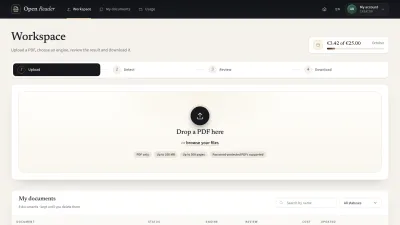
Turn a PDF into structured content you can check and correct, page by page. Follow the document journey below, or find an account, site management or administration task for your role. Screens use sample documents and accounts; each illustration identifies whether it is a historical local-site capture or a static prototype.
The job, end to end
- 1UploadOpen one PDF
- 2DetectChoose pages and engine
- 3ReviewCheck and correct
- 4DownloadChoose your output
Who does what
Visitor
Anyone on the public site who has not logged in.
Creator
Uploads PDFs, chooses an engine, reviews and corrects the result and downloads it.
- Log in and find your workspace
- Manage your account and monthly usage
- Upload and open a PDF
- Choose pages and start detection
- Watch processing and recover from errors
- Check the extracted result page by page
- Correct text, tables and reading order
- Re-read a region or run pages again
- Download structured data or a readable file
- Find, rename and remove your documents
Content Admin
Keeps the public pages, engines, limits and budgets right and watches usage. Works with documents like a Creator.
- Log in and find your workspace
- Manage your account and monthly usage
- Upload and open a PDF
- Choose pages and start detection
- Watch processing and recover from errors
- Check the extracted result page by page
- Correct text, tables and reading order
- Re-read a region or run pages again
- Download structured data or a readable file
- Find, rename and remove your documents
- Update public pages and translations
- Configure engines and their availability
- Set limits, budgets and retention
- Read usage and monitor the site budget
Admin
Manages accounts in Drupal administration and uses Switch user to support users within their own access.