





Guide › Getting started › Free trial
Try a PDF without an account
Why it matters
Follow the same PDF journey with temporary results when public Trial is enabled.
Before you begin: The public homepage must show a Trial upload area. Use the file limits and retention time displayed by your site.
- 1
Upload in the Trial area
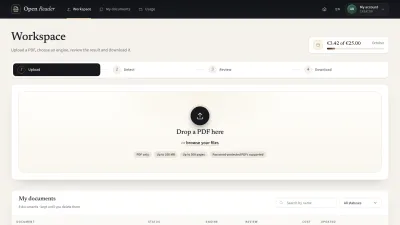
VisitorOn the public homepage, choose or drop one PDF in the Trial upload area. If it is unavailable, log in or request an account.
Static prototype illustration · sample content; no live operation is shown. - 2
Choose pages and a free engine
Review the scan summary and page range. Trial offers Free engines that process locally; cloud and paid engines are unavailable.
Static prototype illustration · sample content; no live operation is shown. - 3
Review the temporary result
Check the extracted blocks against the original page and correct them as needed. Read the temporary-result notice and deletion time.
Static prototype illustration · sample content; no live operation is shown. - 4
Download before the trial expires
Select an available output format and download the result before leaving the session or reaching the deletion time.
Static prototype illustration · sample content; no live operation is shown. - Good to know
- A Trial document belongs to the current browser session. Closing the browser or losing the session can remove your access.
- Logging in or registering does not move Trial documents to an account. Download the result while you still have access.
- Result to check
You have a downloaded result from your temporary PDF. Availability, limits and retention follow your installation’s current settings.