Channels and publishing

Checked again just before sending

  • An account on the channel, your own website, or an e-mail address on your own domain
Anonymous
Your channels

Owner

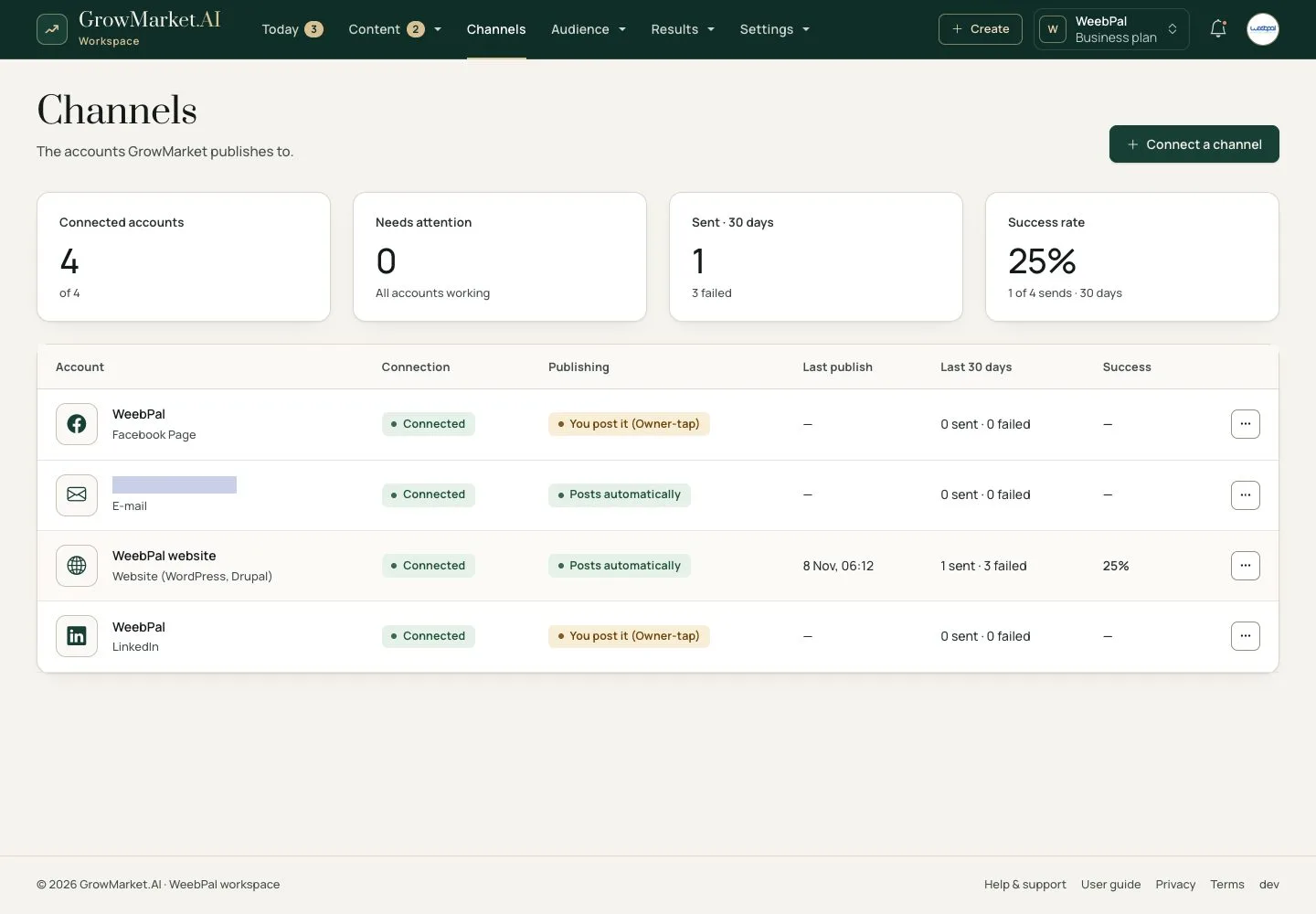
Your channels

1Step 1 of 16

  1. Channels: every account GrowMarket publishes to, with its connection, publishing mode, last publish and success rate.

Open illustrated screen ↗Full image ↗

Anonymous · Channels and publishing01

Connect a channel

Owner

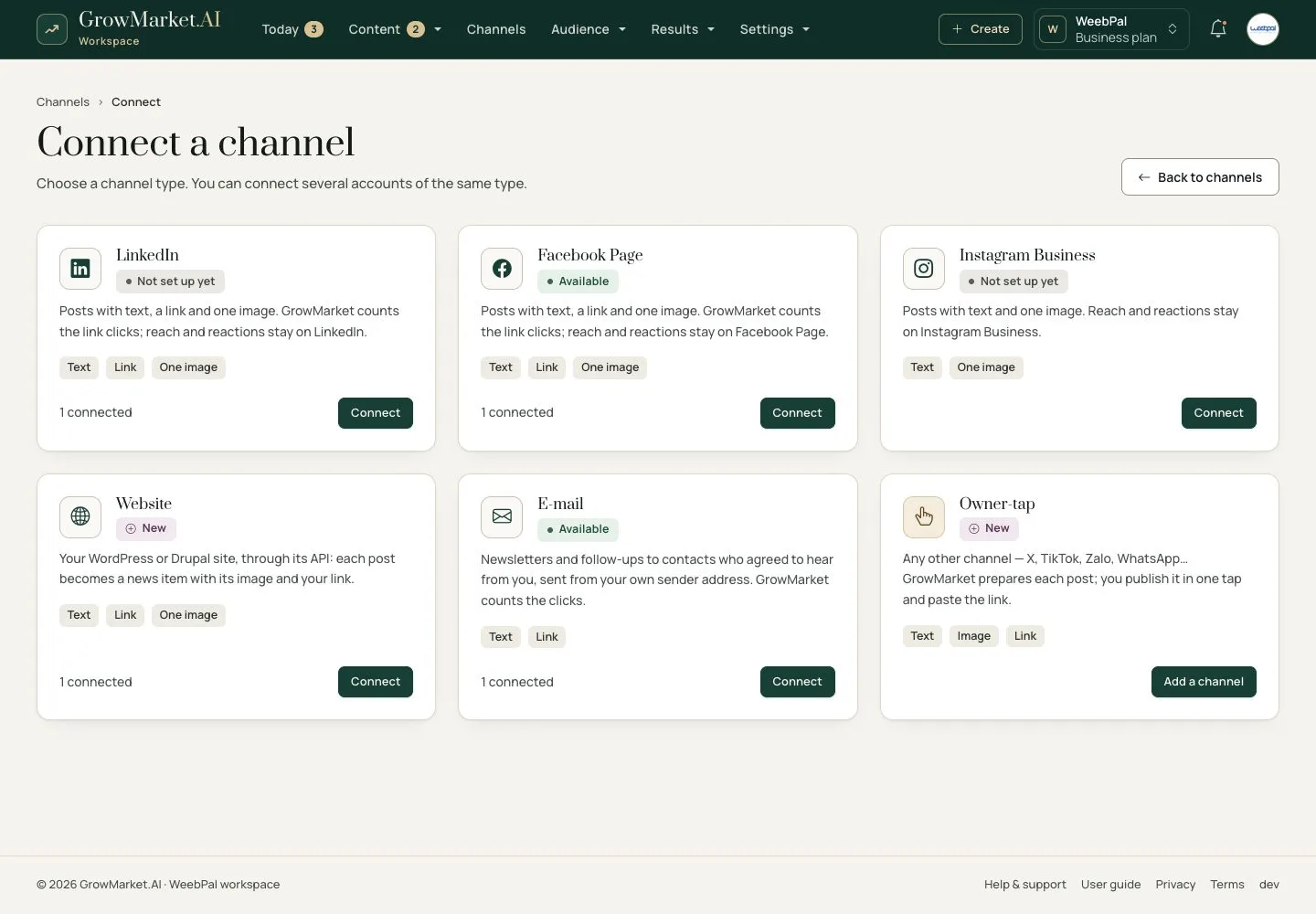
Connect a channel

2Step 2 of 16

  1. Choose a type: LinkedIn, Facebook Page, Instagram Business, Website, E-mail or Owner-tap for any other channel.
  2. Each card says what goes out and whether the platform is set up; reach and reactions stay on the platform.
  3. Several accounts of one type are separate channels.

Open illustrated screen ↗Full image ↗

Anonymous · Channels and publishing02

Your website

Owner

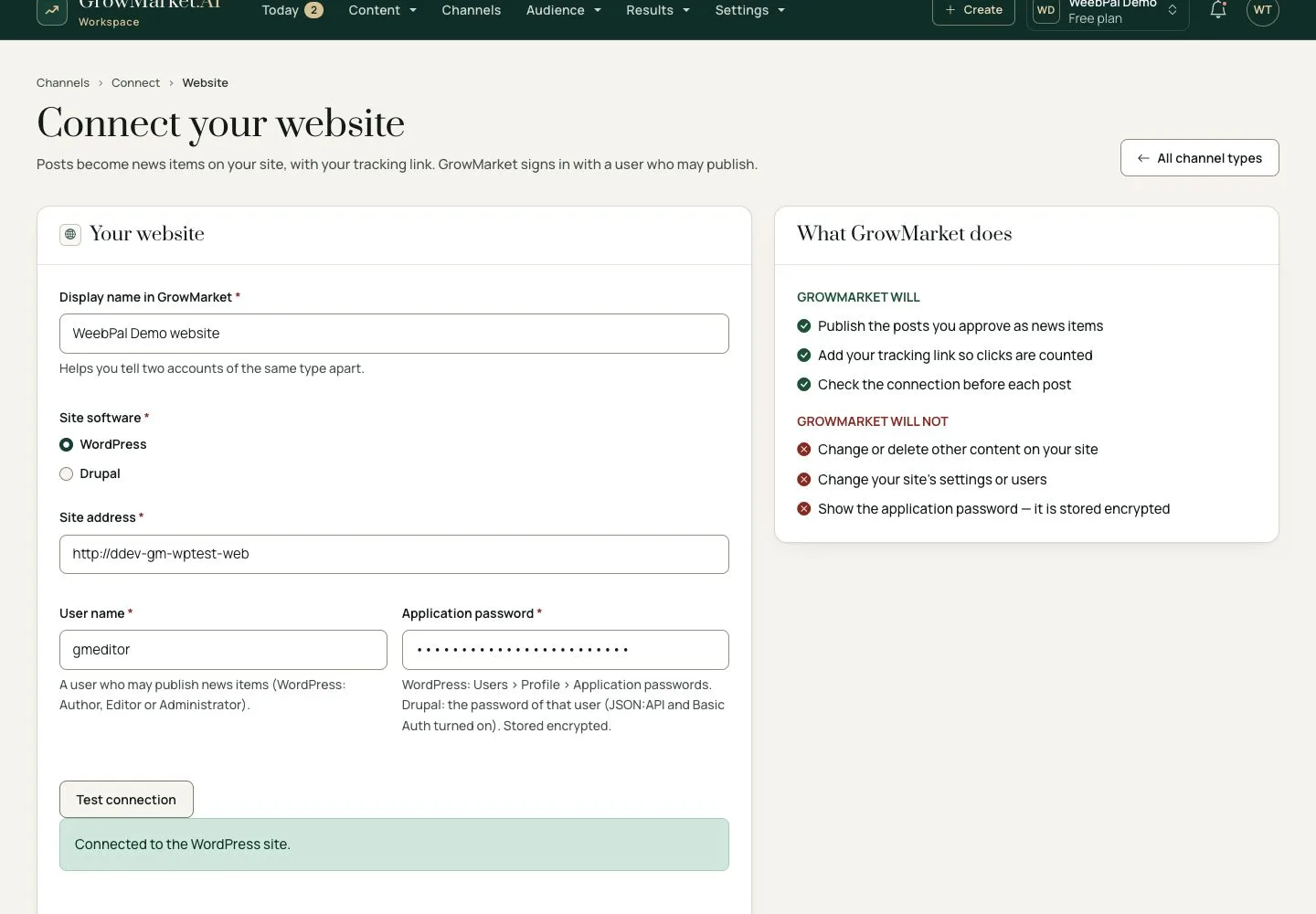
Your website

3Step 3 of 16

  1. Your WordPress or Drupal site, a user who may publish news items and its application password.
  2. Test connection before Connect channel; the password is stored encrypted.

Enlarge, then scroll

Open illustrated screen ↗Full image ↗

Anonymous · Channels and publishing03

Your e-mail address

Owner

Your e-mail address

4Step 4 of 16

  1. Connect › E-mail: an address on your own domain and the sender name; Gmail, Outlook and other mailbox providers are refused.
  2. The account page lists the DNS records to add where your domain is hosted, and the DMARC line; each says Found once it is there.
  3. Verified: e-mails go out from your address. Until then nothing is sent; GrowMarket checks every hour, Check now at once.

Enlarge, then scroll

Open illustrated screen ↗Full image ↗

Anonymous · Channels and publishing04

Posting authority

Owner

Posting authority

5Step 5 of 16

  1. Settings › Approval & posting › Posting authority: how many approved posts GrowMarket may publish on its own, until when.
  2. It ends on its own; GrowMarket never extends it.

Open illustrated screen ↗Full image ↗

Anonymous · Channels and publishing05

Authority ends soon

Owner

Authority ends soon

6Step 6 of 16

  1. With 7 days or 2 posts left, Today asks you to extend it.
  2. Extend opens the same form: the number of posts and the end date.
  3. GrowMarket never extends it for you.

Enlarge, then scroll

Open illustrated screen ↗Full image ↗

Anonymous · Channels and publishing06

Revoke authority

Owner

Revoke authority

7Step 7 of 16

  1. On Approval & posting, the row menu has Revoke.
  2. From then on the posts of that account go On hold at their time, with the reason on the post and on Today.
  3. Grant authority again and a held post goes out by itself.

Enlarge, then scroll

Open illustrated screen ↗Full image ↗

Anonymous · Channels and publishing07

Write a post

Owner

Write a post

8Step 8 of 16

  1. Create post: the product or campaign, account, date and time, topic, content, call to action and link.
  2. Live preview shows it as the chosen channel will; Send for approval.

Enlarge, then scroll

Open illustrated screen ↗Full image ↗

Anonymous · Channels and publishing08

Held before sending

Owner

Held before sending

9Step 9 of 16

  1. Just before sending, the post is checked again: links, facts and numbers, words to avoid, image, connection and authority.
  2. A post that fails is On hold; the reason is under the title and first in Before it goes out.
  3. Fix it and save: it goes back to Approvals.

A number that no fact of the post states waits until you confirm it.

Enlarge, then scroll

Open illustrated screen ↗Full image ↗

Anonymous · Channels and publishing09

Words to avoid

Owner

Words to avoid

10Step 10 of 16

  1. A post with a line from Words to avoid is held the same way.
  2. The reason names the words.
  3. Change the text; the post goes back to Approvals.

Enlarge, then scroll

Open illustrated screen ↗Full image ↗

Anonymous · Channels and publishing10

Published

Owner

Published

11Step 11 of 16

  1. The calendar marks the post Published, with View post.
  2. Clicks on its call to action are counted through its own tracking link.

Open illustrated screen ↗Full image ↗

Anonymous · Channels and publishing11

On your website

Anonymous

On your website

12Step 12 of 16

  1. The post is a news item of your site, with its hashtags and its call to action.

Enlarge, then scroll

Full image ↗

Anonymous · Channels and publishing12

One account

Owner

One account

13Step 13 of 16

  1. Open an account from Channels to see its state and what it sent.
  2. The Publish log lists each post and each try, with the reason in plain words.
  3. Check now asks the channel again; Reconnect replaces the connection.

Open illustrated screen ↗Full image ↗

Anonymous · Channels and publishing13

When a channel stops

Owner

When a channel stops

14Step 14 of 16

  1. If a website does not answer, GrowMarket tries again, then pauses the account after three failures.
  2. Today and an e-mail tell you; the post waits in Ready to post, so nothing is lost.
  3. When it is back, Resume publishing on the account page starts it again.

If a channel refuses the password instead, Channels shows Reconnect now.

Enlarge, then scroll

Open illustrated screen ↗Full image ↗

Anonymous · Channels and publishing14

Stop a post

Owner

Stop a post

15Step 15 of 16

  1. Stop post keeps it from going out until you resume it; nothing is deleted.
  2. Resume post schedules it again.

Open illustrated screen ↗Full image ↗

Anonymous · Channels and publishing15

Disconnect

Owner

Disconnect

16Step 16 of 16

  1. ⋯ › Disconnect stops publishing to the account.
  2. Its scheduled posts stay in the calendar and wait in Ready to post.

Open illustrated screen ↗Full image ↗

Check

Approved posts go out on time on the channels that may publish; a post that fails a check waits for you with the reason

Anonymous · Channels and publishing16
1 / 17
Privacy Terms