Recurring schedule

Workflow 08 · Rule · Charge line · Activate · Generated visits

Regular cleans are set up once as a rule: which days, what time, at what price and with which operative.

The system then books the visits a few weeks ahead, exactly one per occurrence, and never changes visits already made.

  • Office Administrator
  • An Active client and home
Office Administrator

Recurring schedules

Office Administrator

Recurring schedules

1Step 1 of 9 · workflow step 01

  1. Frequency and dates
  2. Generated to
  3. Status

Enlarge, then scroll

Open illustrated screen ↗Full image ↗

Office Administrator · Recurring schedule01

New recurring schedule

Office Administrator

New recurring schedule

2Step 2 of 9 · workflow step 02

  1. Client and home
  2. Weekly on Tuesday
  3. 09:00–12:00
  4. Start date and horizon

Enlarge, then scroll

Open illustrated screen ↗Full image ↗

Office Administrator · Recurring schedule02

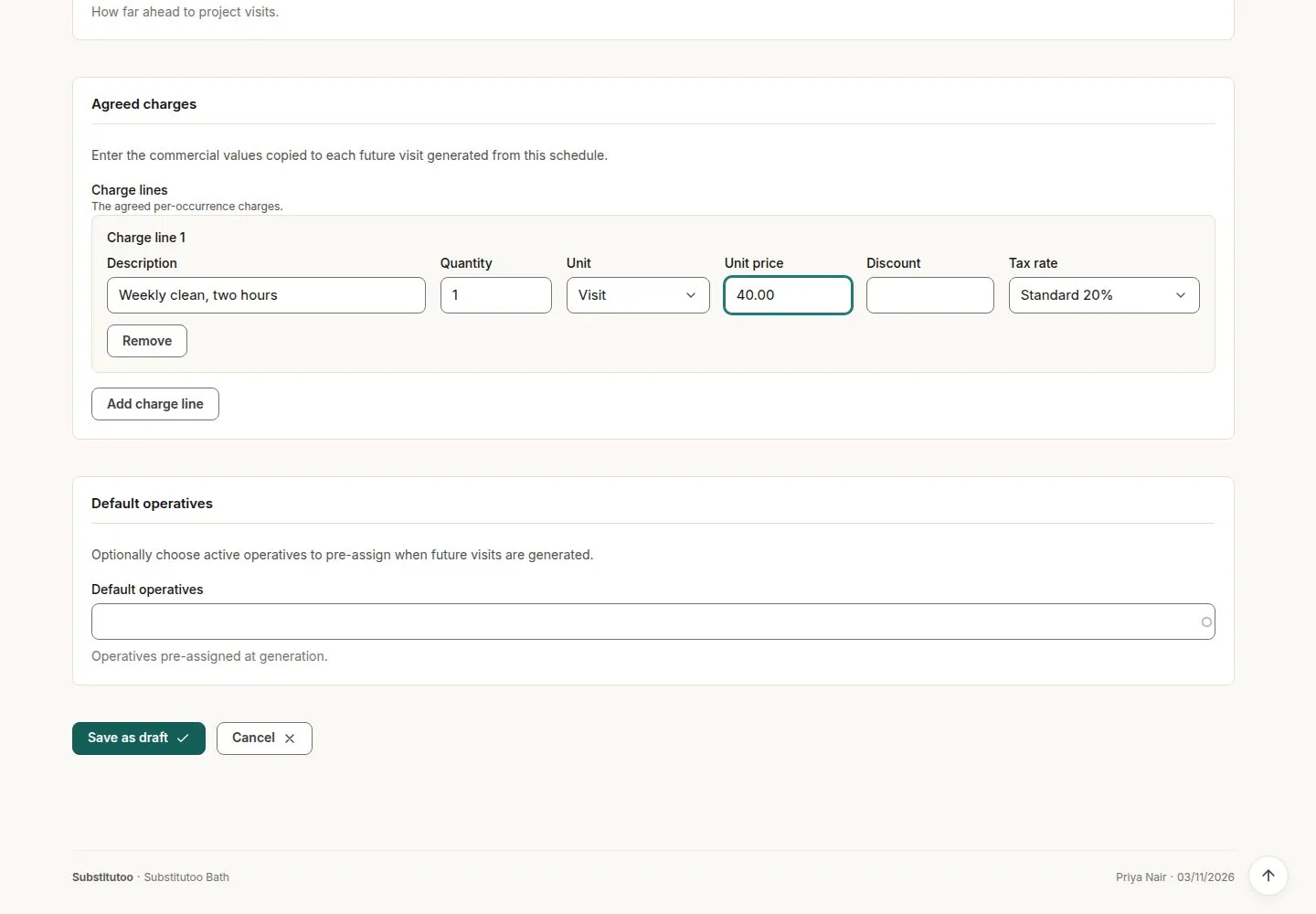
Charge line and usual operative

Office Administrator

Charge line and usual operative

3Step 3 of 9 · workflow step 03

  1. Description, quantity, unit
  2. Price and VAT
  3. Usual operative
  4. Save as draft

Enlarge, then scroll

Open illustrated screen ↗Full image ↗

Office Administrator · Recurring schedule03

Activate

Office Administrator

Activate

4Step 4 of 9 · workflow step 04

  1. Activate
  2. Checks before activation

The rule must produce a date, the client and home must be Active, and there must be a charge line.

Enlarge, then scroll

Open illustrated screen ↗Full image ↗

The system does this
  • Book exactly one visit per weekly or fortnightly occurrence from today up to the horizon, never past the end date; running again books none
  • Skip occurrences while the client is on hold; book a visit with nobody on it when the usual operative is not active, and list it in Operations exceptions
Office Administrator · Recurring schedule04

The schedule and its visits

Office Administrator

The schedule and its visits

5Step 5 of 9 · workflow step 06

  1. The rule
  2. Charge line snapshot
  3. Generated visits

Enlarge, then scroll

Open illustrated screen ↗Full image ↗

Office Administrator · Recurring schedule05

Pause and resume

Office Administrator

Pause and resume

6Step 6 of 9 · workflow step 07

  1. Pause
  2. Resume

No new visits while paused; resuming books no duplicates.

Enlarge, then scroll

Open illustrated screen ↗Full image ↗

Office Administrator · Recurring schedule06

Change days, time, price or operative

Office Administrator

Change days, time, price or operative

7Step 7 of 9 · workflow step 08

  1. Edit
  2. Applies to visits not yet made

Enlarge, then scroll

Open illustrated screen ↗Full image ↗

Office Administrator · Recurring schedule07

End

Office Administrator

End

8Step 8 of 9 · workflow step 09

  1. End
  2. Visits already made are kept

Enlarge, then scroll

Open illustrated screen ↗Full image ↗

Office Administrator · Recurring schedule08

Monthly, quarterly and seasonal

Office Administrator

Monthly, quarterly and seasonal

9Step 9 of 9 · workflow step 04.2

  1. Can be activated
  2. No visits yet

No agreed rule yet for the day of the month or season, so these schedules say they make no visits.

Enlarge, then scroll

Open illustrated screen ↗Full image ↗

Check

One visit per occurrence within the horizon; changes apply forward only

Office Administrator · Recurring schedule09
1 / 10
Privacy Terms