Clients, contacts and homes

Workflow 06 · Clients · Contacts · Homes · Lifecycle

A client is the person or company that pays; its contacts are the people you talk to, and its homes are where the work happens.

Each record keeps its history: nothing is deleted, and a status decides what new work is allowed.

  • Office Administrator
  • Franchise Owner for internal notes
Office Administrator

Clients

Office Administrator

Clients

1Step 1 of 11 · workflow step 01

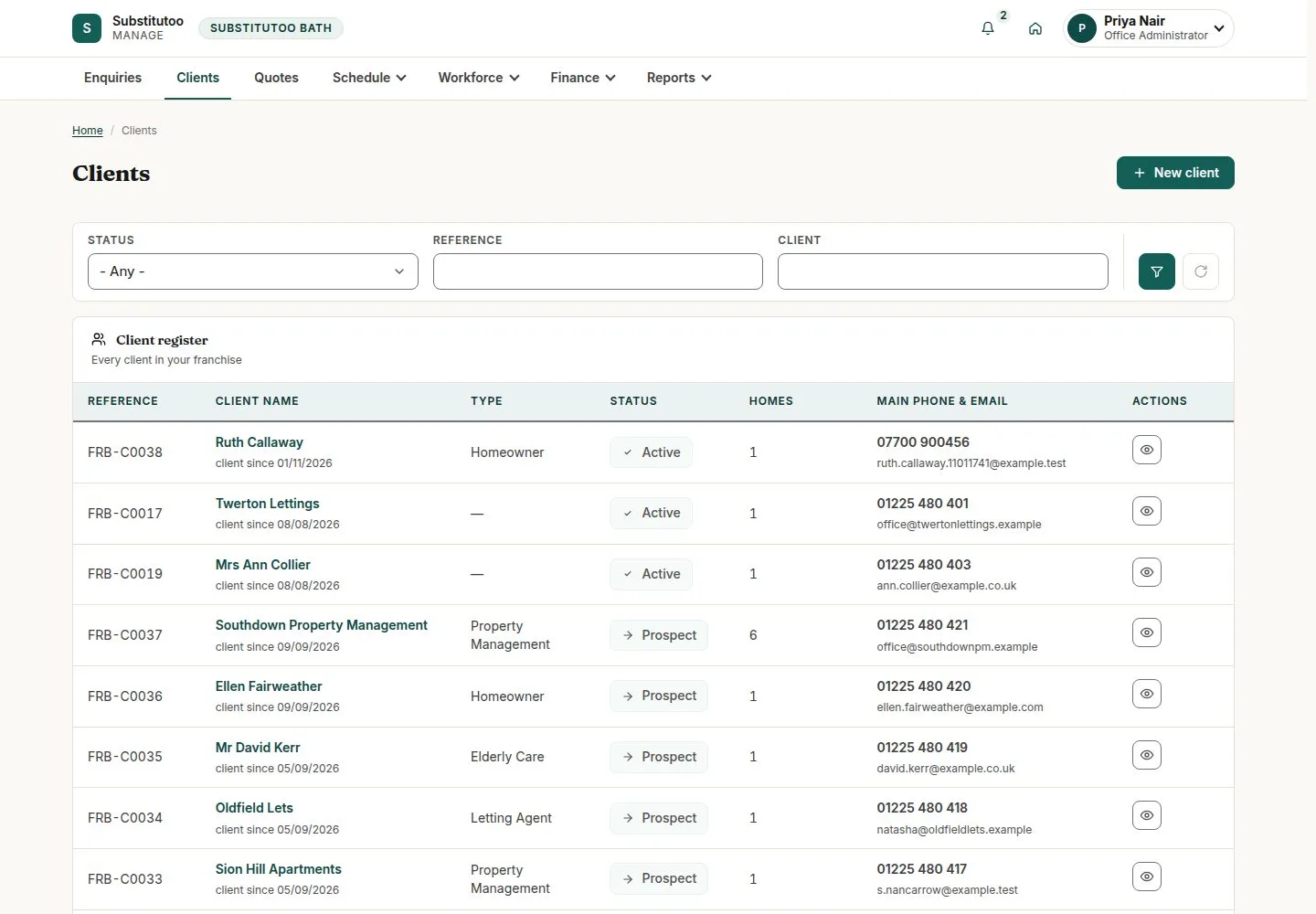
  1. Reference, type, status
  2. Filter or search
  3. Open a client

Enlarge, then scroll

Open illustrated screen ↗Full image ↗

Office Administrator · Clients, contacts and homes01

New client

Office Administrator

New client

2Step 2 of 11 · workflow step 01.1

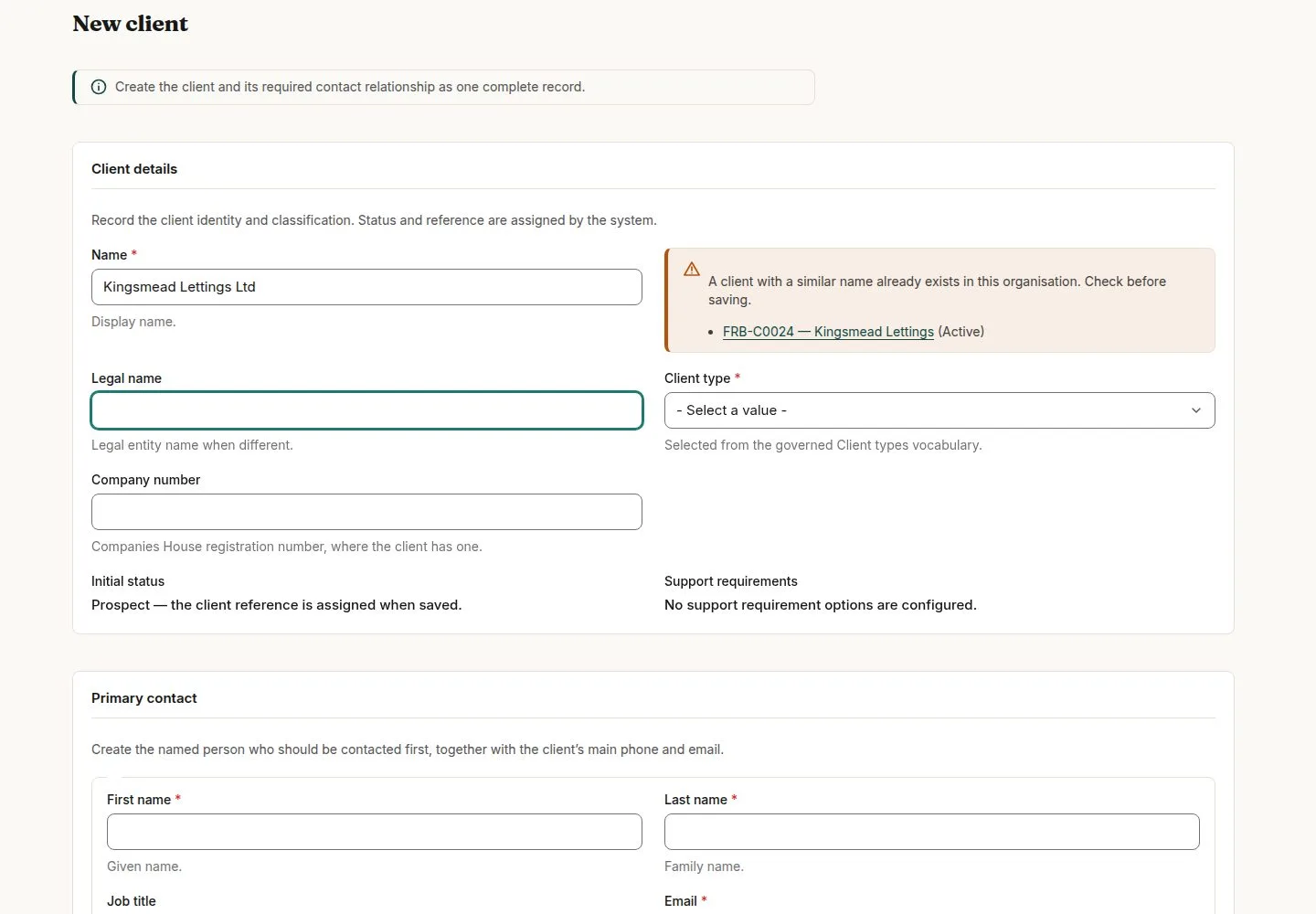
  1. Client details
  2. Primary contact
  3. Billing
  4. Save

A similar name in the franchise is shown as a warning; it never blocks.

Enlarge, then scroll

Open illustrated screen ↗Full image ↗

Office Administrator · Clients, contacts and homes02

One page per client

Office Administrator

One page per client

3Step 3 of 11 · workflow step 02

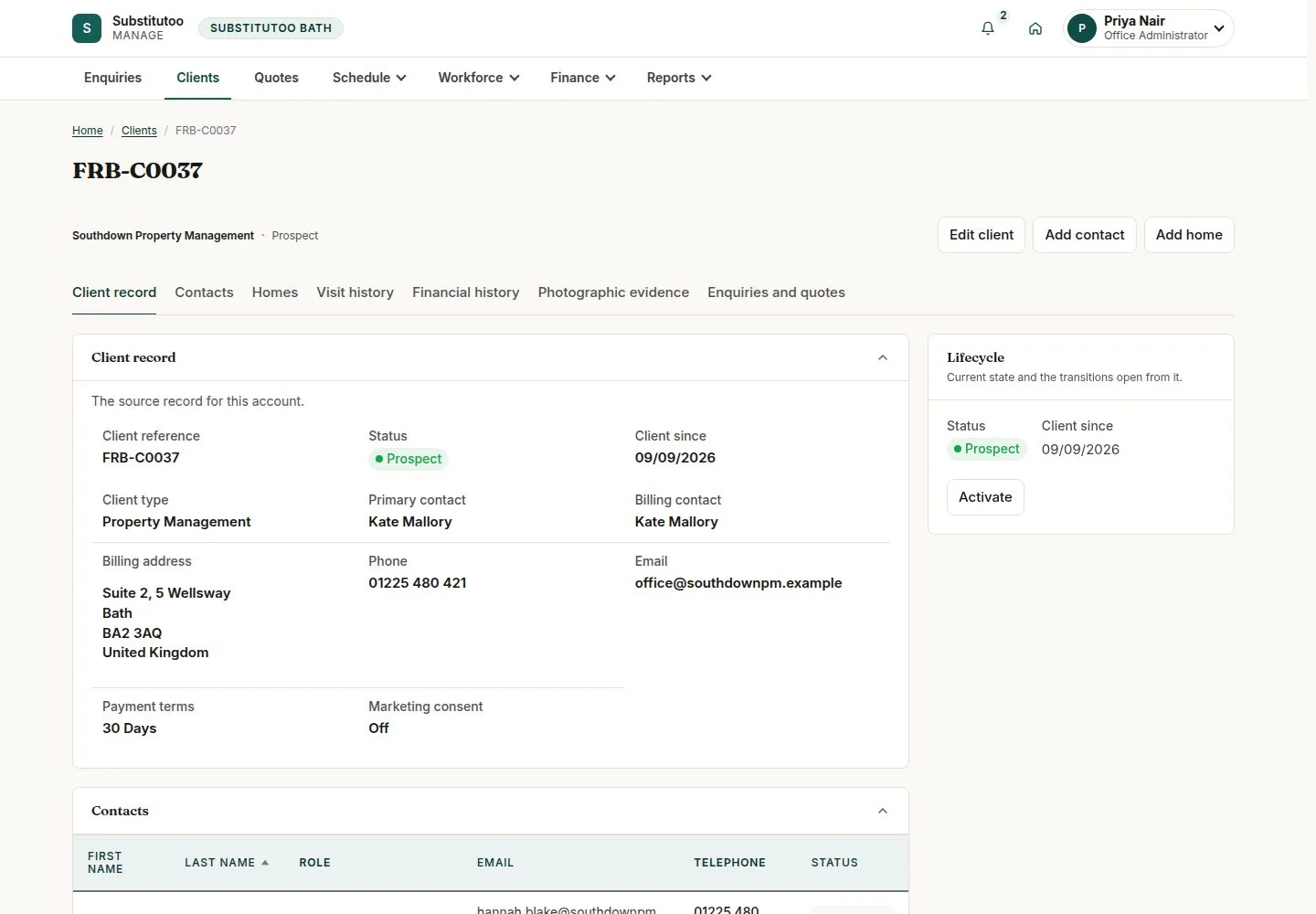
  1. Client record
  2. Contacts and homes
  3. Visits and money
  4. Lifecycle

Enlarge, then scroll

Open illustrated screen ↗Full image ↗

Office Administrator · Clients, contacts and homes03

Add contact

Office Administrator

Add contact

4Step 4 of 11 · workflow step 03

  1. Name and phone
  2. Preferred channel
  3. Contact roles
  4. Marketing consent

Enlarge, then scroll

Open illustrated screen ↗Full image ↗

Office Administrator · Clients, contacts and homes04

Marketing consent by channel

Office Administrator

Marketing consent by channel

5Step 5 of 11 · workflow step 03.1

  1. Edit contact
  2. Grant or withdraw
  3. Consent history

Every change is added to the history with its date and time.

Enlarge, then scroll

Open illustrated screen ↗Full image ↗

Office Administrator · Clients, contacts and homes05

Add home

Office Administrator

Add home

6Step 6 of 11 · workflow step 05

  1. Address and property type
  2. Home features
  3. Service window
  4. Access instructions

Access instructions are required.

Enlarge, then scroll

Open illustrated screen ↗Full image ↗

Office Administrator · Clients, contacts and homes06

Home features set the skills needed

Office Administrator

Home features set the skills needed

7Step 7 of 11 · workflow step 05.2

  1. Carpets, Windows, Oven
  2. Required competencies

Enlarge, then scroll

Open illustrated screen ↗Full image ↗

Office Administrator · Clients, contacts and homes07

Home detail

Office Administrator

Home detail

8Step 8 of 11 · workflow step 06

  1. Location
  2. Open in what3words
  3. Open in Google Maps

Enlarge, then scroll

Open illustrated screen ↗Full image ↗

The system does this
  • Copy the home's access instructions, risk notes and property details once into each new visit's Brief of Works
Office Administrator · Clients, contacts and homes08

Temporarily close a home

Office Administrator

Temporarily close a home

9Step 9 of 11 · workflow step 08

  1. Temporarily close
  2. Reopen later

No new visit at a closed home; the client's status does not change.

Enlarge, then scroll

Open illustrated screen ↗Full image ↗

Office Administrator · Clients, contacts and homes09

Put a client on hold

Office Administrator

Put a client on hold

10Step 10 of 11 · workflow step 09

  1. Put on hold
  2. Activate again

On hold: no new visit, no scheduling or starting; finished work can still be approved and invoiced.

Enlarge, then scroll

Open illustrated screen ↗Full image ↗

The system does this
  • Skip recurring visits while a client is on hold; they are not made up later
  • Keep every client, contact and home: there is no delete, only Mark inactive and Archive
Office Administrator · Clients, contacts and homes10

Internal notes

Franchise Owner

Internal notes

11Step 11 of 11 · workflow step 11

  1. Franchise Owner only
  2. Internal notes

Enlarge, then scroll

Open illustrated screen ↗Full image ↗

Check

Client, contacts and homes current; status matches the work allowed

Office Administrator · Clients, contacts and homes11
1 / 12
Privacy Terms