










Report damage or found stone
Report damage · Photographs · Found stone
- The area is safe
Worker
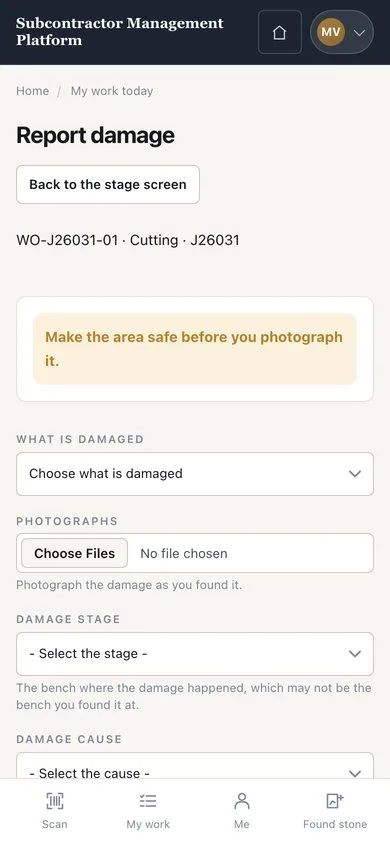
Report damage
Worker

1Step 1 of 2
- Press “Report damage” on the work card or stage
- Add photographs; choose the stage, the cause and whether the piece can still be used
- Describe what happened and press “SAVE THE DAMAGE REPORT”
Add at least one photograph and ten characters, without naming anybody. The Supervisor decides any rework.
Enlarge, then scroll
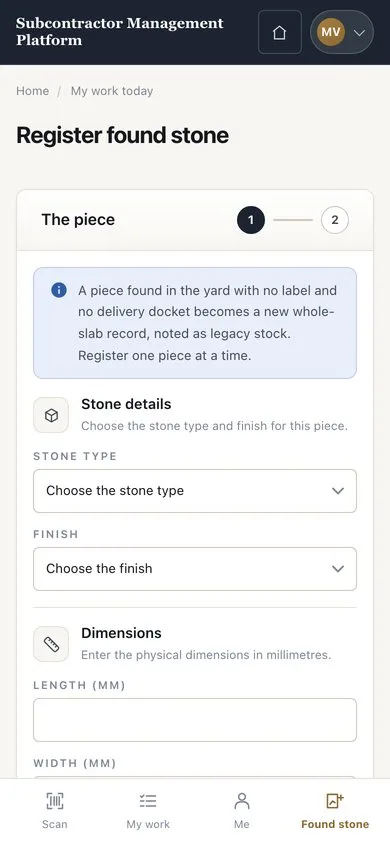
Register found stone
Worker

2Step 2 of 2
- Check the piece for an existing label first
- Open the “Found stone” tab
- Enter the stone, dimensions and a photograph, then press “Continue”
Enlarge, then scroll
Open illustrated screen ↗Full image ↗
Check
The damage or the found piece is on record for the Supervisor or the Warehouse.
1 / 3